

Most people know TeraBox as a cloud drive for storing and sharing files. The recent TeraBox upgrade, however, pushes the platform beyond storage and toward an all-in-one AI workspace.
Having more AI tools in one place sounds convenient, but does it actually reduce the time spent moving between apps, or simply add more feature clutter?
To find out, I spent a full workday inside TeraBox AI Space handling routine tasks, including cleaning up meeting notes, drafting slides, generating visuals, and organizing deliverables. I wanted to see whether keeping more of that work in one place actually made the day easier.
What Are You Actually Getting with the New TeraBox AI Space?
Instead of launching separate external tools across browser tabs, TeraBox AI Space builds AI productivity tools directly into your cloud directory.
It focuses on four core hubs:
Document Analysis & Writing
Tera AI lets you summarize uploaded PDFs, extract key notes, and draft text directly alongside your file directory.
Slide & Presentation Creation
Built-in presentation modules turn raw outlines or topics into structured slide decks without requiring external presentation software.
Visual Asset Generation
Integrated media tools generate graphics from text prompts or edit existing images directly inside your storage.
Audio Transcription
Native transcribers convert voice notes or recorded meeting syncs into text, linking the output directly to your audio files.
The main difference is that your files are no longer separate from the tools you use to work with them.
One Workday, One Workspace: Using TeraBox AI Space in Real Life
Rather than trying each tool with unrelated samples, I used the same RemoteFlow project throughout the day. That made it easier to see how well the different parts of the workspace actually fit together.
Here is how the system handled each part of the day.
Step 1: Processing Meeting Audio with AI Notebook
My morning started with a raw audio recording from an alignment sync. Normally, processing this requires opening a third-party transcription app, waiting for the upload, exporting text, and manually extracting key points.
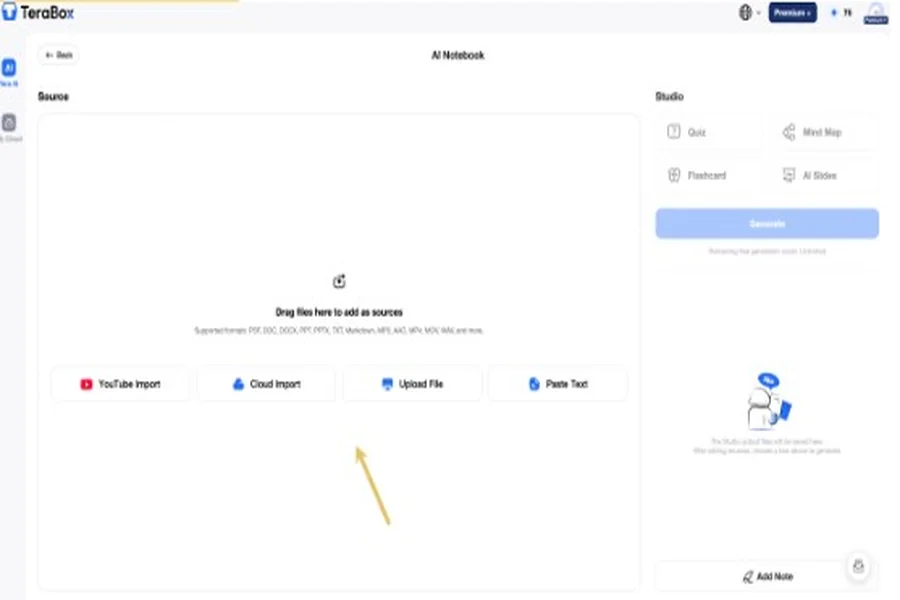
I opened AI Notebook directly from the dashboard and uploaded the local .mp3 file.
Two features made the output useful:
- Timestamps: The transcript included timestamps alongside the conversation, which made it easier to return to a specific part of the meeting when I needed to check the context.
- Key takeaways: The summary pulled out the main decisions, deadlines, and assigned owners instead of leaving me with a long transcript to sort through.
Step 2: Analyzing Campaign Briefs with Tera AI
Next, I needed to digest a six-page PDF brief for the RemoteFlow campaign. I opened Tera AI, attached the file, and requested a concise manager summary covering target audiences, core selling points, major deadlines, and potential timeline conflicts.
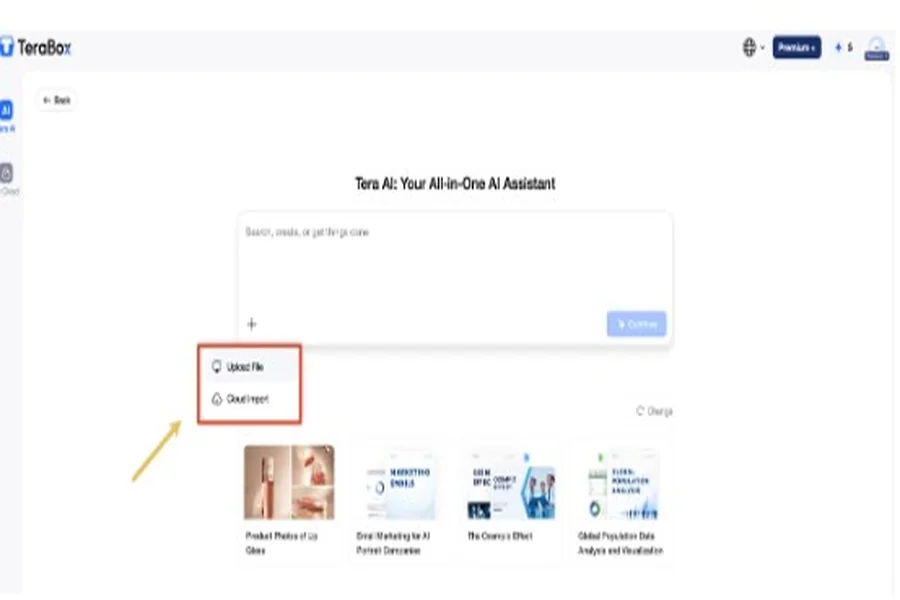
The side-by-side view worked well in practice. Tera AI agent caught a specific timeline discrepancy: an earlier planning note mentioned September 12, but September 15 was recognized as the final public launch date later in the document. Catching that automatically saved me from re-reading the entire PDF just to confirm dates.
Step 3: Generating Slide Decks with AI Presentation
With the brief summarized, I opened AI Presentation Agent to build a 5 to 10-slide internal launch deck directly from the PDF.
The generation process follows a practical two-stage flow:
- Outline Review First: Rather than dumping finished slides instantly, the system generates an editable outline. This lets you reorder sections, edit bullet points, or add custom topics before rendering the design.
- Fast Rendering: Once confirmed, the system took under a minute to organize content, apply visual layouts, and display the finished deck.
Note on limits: Free tier uploads are capped at 5 MB per document (up to 20 MB on Premium+), and the tool currently processes one primary document at a time.
Step 4: Generating Campaign Visuals with AI Image
To complete the campaign files, I clicked into Image Generation right from the main menu to pull together a hero image for our landing page concept.
I entered a prompt describing a clean, modern workspace layout. I stuck with the standard model for a quick draft, though higher-tier options like Nano Banana are available for detailed outputs. The image rendered in about 30 seconds, came through clean without any forced watermarks, and saved straight into my project folder.
Skipping the usual download, rename, and re-upload loop was a small friction reducer that kept the workday moving.
Step 5: Centralizing Project Files in the Cloud
By the end of the workflow, all my project assets were automatically organized inside My Cloud, including the original PDF, the presentation deck, and the new visual.
Having the Tera AI panel docked on the right side made file retrieval easy. I could search through stored materials or pull quick details directly from the chat panel without opening each file individually. Leaving heavy assets strictly in the cloud also saved significant local disk space on my laptop.
Is the All-in-One Convenience Worth the Trade-Off?
Staying in one tab gave the workday noticeably better momentum. Eliminating the constant switching between browser tabs kept me focused on the actual project work.
However, TeraBox AI Space is not a complete replacement for specialized software:
- Design Control: Dedicated platforms still offer far superior control when custom master templates, exact typography, or layer-by-layer editing matter.
- Single-File Inputs: The presentation tool accepts one primary source document at a time, which can feel restrictive if your project relies on several reference briefs at once.
Who Should Actually Upgrade to TeraBox AI Space?
The RemoteFlow project only covered part of the workspace; other tools include file conversion, AI video generation, and AI Notebook outputs such as mind maps and flashcards.
At JPY 1,574 per month on the Japan pricing page I checked, Premium+ makes the most sense if these AI tools already match the kind of work you do regularly.
Who Will Benefit Most
- Solo creators and marketers: If your routine moves from briefs and research into slide decks, social copy, and campaign visuals, keeping those tasks close to your files can cut down on a lot of small interruptions.
- Existing TeraBox users: If your documents and media already live in TeraBox, the upgrade adds AI tools around a file library you are already using instead of asking you to build another workspace from scratch.
- Teams needing quick internal drafts: For sync decks, rough pitch outlines, meeting follow-ups, and first-pass visuals, getting a usable draft quickly may matter more than having precise control over every detail.
Who May Be Better Off with Specialized Tools
- Designers and brand teams: Dedicated design software is still the better fit when you need strict brand templates, precise typography, or detailed layout control.
- Advanced visual creators: If your work depends on layers, detailed image editing, or fine-grained generation controls, specialized creative tools offer more flexibility.
- Heavy document researchers: The single-source limit I encountered in AI Presentation can become restrictive when a deck needs to pull from several briefs or reference documents at once.
FAQs
Can I create a presentation directly from a PDF in TeraBox?
Yes. You can upload a PDF to AI Presentation, and the Agent will use the document to build a slide outline before generating the full deck. You can review and adjust the outline first, which is useful if the source file contains more information than you want in the final presentation.
Do I need Premium+ to use TeraBox AI Space?
Not necessarily. The free plan gives you a way to try some of the AI features, but the limits are tighter. For example, the presentation workflow I used accepted files up to 5 MB on the free tier, while Premium+ increased the limit to 20 MB and included additional AI credits. If you only use these tools occasionally, the free option may be enough to start.
Are generated images watermarked?
In my test, the image generated through AI Image had no visible watermark and was ready to use in the campaign materials. That made it easier to move the result straight into a slide or social asset without an extra cleanup step.
How fast does TeraBox AI Space generate slides, summaries, and images?
It depends on the task and model. In my run, the campaign image took about 30 seconds, while the presentation was ready in under a minute. Document processing was also fairly quick, although larger files and more complex requests may take longer.
Can TeraBox AI Space replace standalone tools like ChatGPT or Canva?
For some everyday tasks, it can cover part of the same workload. I was able to summarize documents, draft presentation content, and generate campaign visuals without leaving the workspace. But I would still use specialized tools when I need deeper conversations, precise design control, advanced editing, or highly customized outputs.
Can TeraBox AI Space work with multiple source files at once?
The AI Presentation Agent I used accepted one primary source file at a time. That worked fine for the six-page campaign brief, but it is less convenient if a deck needs to pull from several PDFs or reference documents. In that case, you may need to combine the source material first.
Conclusion
By adding functional AI tools directly onto the drive, TeraBox AI Space transforms traditional cloud storage into an active workstation. It will not replace every complex creative tool, but if you value momentum and want to turn raw project files into usable drafts without leaving your browser tab, it offers a practical way to streamline your workday.
If you are curious, try TeraBox with a real brief or PDF from your own workflow and see whether the setup actually makes sense for the way you work.
