

Introduction
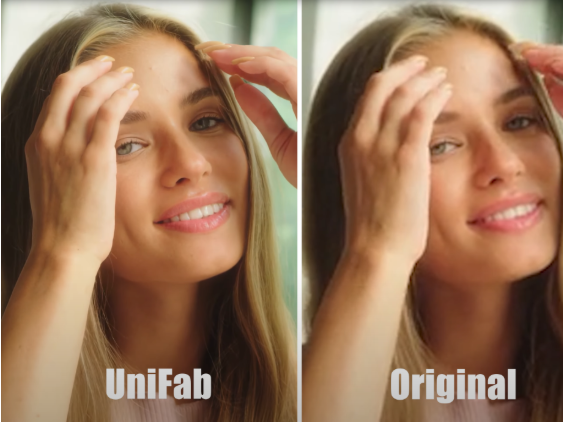
Enhancing video quality is no longer a luxury reserved for professionals; it has become a necessity in today’s visually driven world. Videos are everywhere—from social media to advertising, education, and entertainment—and the demand for crisp, clear, and vibrant footage continues to rise. However, many users face challenges when dealing with low-resolution videos, noise, poor color balance, or other common quality issues. Traditionally, improving these aspects required expertise in complex software and hours of manual editing. Fortunately, UniFab Video Enhancer AI offers a breakthrough solution by harnessing artificial intelligence to simplify and accelerate video enhancement without compromising quality.
Why Upgrade Your Video Quality?
Many factors can deteriorate video quality. Aging tape footage, low-light conditions during filming, and compression to reduce file size all contribute to videos that look blurry, noisy, or washed out. These imperfections not only affect viewer engagement but also reduce the professional appeal of video content. Considering the widespread use of videos across platforms, enhancing their quality effectively can significantly boost impact and audience retention.
The manual approach to video enhancement involves several technical steps such as upscaling, noise reduction, color correction, and exposure adjustment. These steps traditionally require powerful computers and expert knowledge in editing software like Adobe Premiere or DaVinci Resolve. This creates a barrier for many individuals and small organizations who want to improve their video content without investing heavily in training or equipment.
What Sets UniFab Video Enhancer AI Apart?
UniFab Video Enhancer AI marks a significant shift by introducing deep learning and AI-driven technology into video enhancement. Instead of relying on traditional manual techniques, it uses smart algorithms to automatically analyze every frame and apply improvements intelligently. This not only reduces editing time drastically but also achieves results difficult to match with manual editing alone.
Intelligent Resolution Upscaling
One of the most impressive features of this tool is its AI-based upscaling capability. Standard methods of upscaling typically enlarge an image using interpolation, which often results in blurry or pixelated videos. UniFab employs convolutional neural networks (CNNs) to reconstruct missing details based on learned patterns from millions of high-resolution images. This process leads to sharper, clearer videos that preserve fine details and textures.
Noise and Artifact Removal
Many low-quality videos suffer from visual noise, especially in darker scenes or heavily compressed files. Rather than applying generic noise filters, UniFab’s AI identifies noise patterns and differentiates them from meaningful visual information. This selective cleaning preserves the natural texture of the video while reducing distracting grain and compression artifacts, delivering a smoother viewing experience.

Performance and Usability
Powered by GPU acceleration, UniFab offers fast processing speeds even for large videos or batch conversions. Its user-friendly interface caters to novices and professionals alike. Users only need to upload their video, choose enhancement settings, and start the process. The software handles the complex computations behind the scenes, removing the need for manual fine-tuning that would otherwise consume hours.
Applications and Benefits Across Industries
The versatility of UniFab Video Enhancer AI makes it suitable for numerous fields:
- Archival Restoration: Film archives and national libraries can use it to restore aging footage, making historical videos accessible with new clarity for future generations.
- Content Creation: YouTubers, vloggers, and social media influencers benefit by improving the quality of their original videos, attracting more viewers with polished visuals.
- Corporate Media: Marketing teams upload promotional videos enhanced with balanced colors and higher resolution to better captivate customers.
- Personal Use: Everyday users can convert home videos into sharper, more vivid keepsakes that better preserve memories.
Why Choose AI-Powered Video Enhancement?
While some may prefer manual editing for absolute control, AI Video Enhancer like UniFab provide a strong alternative by eliminating repetitive tasks and minimizing human error. AI-driven enhancement can adapt to a wide variety of footage types and conditions without the user needing to have advanced technical skills. Furthermore, UniFab’s balance between improving visual quality and maintaining naturalness ensures that videos don’t become overly processed or artificial-looking.
Getting Started with UniFab Video Enhancer AI
Step 1: Launch UniFab and Import Your Video
Open the UniFab application, then select the enhancement mode that best suits your needs. After choosing the mode, import your video by clicking the upload button or dragging the file into the workspace.
Step 2: Customize Output Settings (Optional)
Adjust your output preferences, such as resolution, video quality, codec, and file format to match your specific requirements. These customization options allow you to control the final video’s appearance and compatibility.
Step 3: Start the Enhancement Process
Once you have completed the customization, click the “Start” button to initiate the enhancement. UniFab will automatically process your video using its advanced AI algorithms, delivering an improved version quickly and efficiently.
Conclusion
Video quality is a cornerstone of effective communication in our digital age. The ability to quickly and effectively enhance videos without complex software or extensive editing knowledge empowers creators at all levels. UniFab Video Enhancer AI stands out by delivering smart, AI-driven upgrades that bring new life to videos, whether they are cherished family memories, business content, or creative projects. By embracing this technology, users gain a valuable tool to produce clear, vibrant, and professional-grade videos, helping their content truly stand out in a crowded digital landscape.
